# Shrink Your Stash: Breaking Down the Ultimate WebP Converter Script
Table of Contents
Hey there. So, you’ve been hoarding high-res PNGs and JPEGs. Maybe it’s a folder of 4K cat photos, maybe it’s an overblown website assets directory. We’ve all been there. Well, as an Web Developer, I have a physical hard drive that gets bogged down with giant files, and absolutely feel your pain when things run slower than they need to.
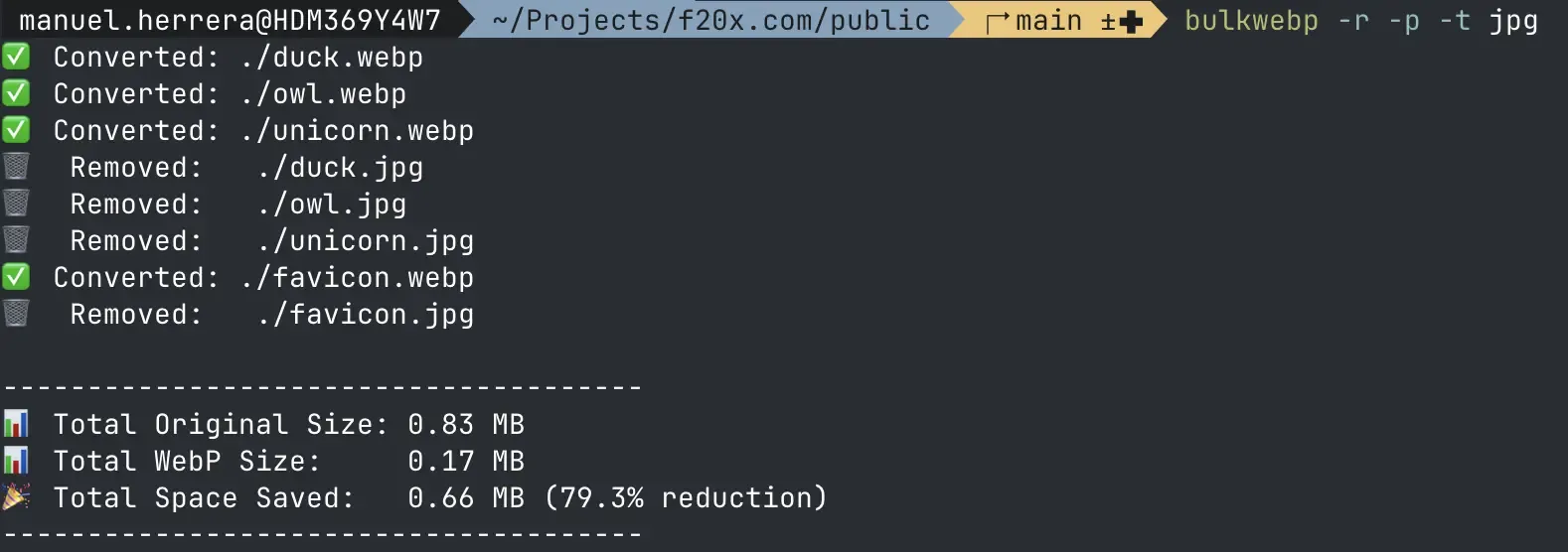
Today, we’re going to take a nice, slow walk through a pretty slick Bash script called bulkwebp (source code). It doesn’t just convert your images to WebP (Google’s highly efficient image format); it throws all your CPU cores at the problem so you aren’t waiting around until the next ice age, and then it gives you a neat little receipt of the megabytes you saved.
Let’s kick back, grab a beverage, and dissect how this bad boy works, piece by piece.
1. Setting the Stage (and Finding Your Cores)
Right out of the gate, the script establishes some ground rules.
REPLACE=falseRECURSIVE_MODE=falseCORES=$(nproc 2>/dev/null || sysctl -n hw.ncpu 2>/dev/null || echo 1)FILE_TYPE=""- The Safety Nets:
REPLACEandRECURSIVE_MODEdefault tofalse. The script isn’t going to go rogue and delete your original files or dive deep into your forbidden subdirectories unless you explicitly tell it to. - The Core Sniffer: That
CORESline is a thing of beauty. It tries to usenproc(common on Linux) to see how many CPU cores you have. If that fails, it triessysctl(the macOS way). If that fails, it just throws its hands up and assumes you have1core. It’s doing the heavy lifting so you don’t have to guess your machine’s specs.
2. The Bouncer: Argument Parsing
Next up, the script has to figure out what you actually want it to do based on the flags you passed in the terminal.
while [ $# -gt 0 ]; do case "$1" in -r|--recursive)...This while loop is basically a bouncer at the club, checking IDs. It looks at the first argument ($1), figures out what flag it is (like -r or --cores), sets the internal variable, and then uses shift to kick that argument out of line so it can check the next one.
3. The Bloodhound: Building the find Command
Instead of hardcoding how to search for files, the script dynamically builds a find command based on the flags you set.
- Staying shallow: If
RECURSIVE_MODEis false, it slaps-maxdepth 1onto the command so it only looks in the current folder. - Picking targets: If you specified a file type, it targets that. Otherwise, it casts a wide net for the usual suspects:
.png,.jpg,.jpeg, and.tiff.
By the end of this section, FIND_CMD is a fully loaded string ready to sniff out your hefty images.
4. The Heavy Lifting: xargs and Parallel Processing
This is where the script goes from “neat” to “absolute beast.”
Instead of converting files one by one in a slow, agonizing queue, it uses xargs -P "$CORES".
- Exporting Variables: It uses
export REPLACEso the mini-scripts running in parallel know if they have permission to delete the original files. - The Payload (
SCRIPT): It defines a chunk of code that usescwebpto do the actual conversion. It also useswc -cto count the exact byte size of the original file and the new WebP file. - The Secret Messages: Notice how it
echos out things like✅ Convertedbut also outputs a weird line likeSIZE_STATS 150000 45000? That is a hidden data string meant for the next part of our script. It’s like the workers passing notes to the accountant.
5. The Accountant: awk
Finally, all this parallel terminal output gets piped (|) into awk, which is basically the spreadsheet nerd of the Linux world.
awk '/^SIZE_STATS/ { orig_total += $2 new_total += $3 next}...awk sits at the end of the pipeline, reading every line of text that the conversion workers spit out.
- If it sees a line starting with
SIZE_STATS, it says, “Ah, data!” It intercepts those numbers, adds them to a running total, and hides the line from your screen (next). - If it sees any other line (like the green checkmarks or the trash can emojis), it just prints it normally so you can watch the progress.
Once all the files are done (the END block), awk does some quick math to convert those bytes into Megabytes, calculates the percentage of space you saved, and prints out a beautiful little receipt.
The Verdict
This script is a fantastic example of gluing together standard Unix tools (find, xargs, awk) to create something highly efficient. It respects your time by using parallel processing, and it respects your terminal by giving you a clean, readable summary at the end instead of just vomiting data onto the screen.
The Full Script
In case you where wondering what I’m talking about, and you missed the link in the introduction, here you have the full script for your delight:
#!/bin/bash
# Default values for flagsREPLACE=falseRECURSIVE_MODE=false # Use a simple boolean for logicCORES=$(nproc 2>/dev/null || sysctl -n hw.ncpu 2>/dev/null || echo 1) # Get core countFILE_TYPE="" # Variable to store the optional file extension
### Displays help message##show_help() {cat << EOFUsage: bulkwebp [OPTIONS]Converts images in the directory to WebP format and calculates space saved.
This high-performance version processes files in parallel for maximum speed.
Options:  -r, --recursive   Recursively search for images in all subdirectories.  -p, --replace     Delete the original source image after a successful conversion.  -c, --cores NUM   Specify the number of parallel jobs (default: all available cores).  -t, --type EXT    Specify a single input file extension to convert (e.g., png, jpg). Defaults to all common formats.  -h, --help        Display this help message and exit.EOF}
# --- Argument Parsing ---while [ $# -gt 0 ]; do  case "$1" in    -r|--recursive)      RECURSIVE_MODE=true      shift      ;;    -p|--replace)      REPLACE=true      shift      ;;    -c|--cores)      CORES="$2"      shift 2      ;;    -t|--type)      # Remove any leading dot if the user accidentally typed "-t .png" instead of "-t png"      FILE_TYPE="${2#.}"      shift 2      ;;    -h|--help)      show_help      exit 0      ;;    *)      echo "Error: Unknown option '$1'" >&2      show_help      exit 1      ;;  esacdone
# --- Build find command ---# Start with the base commandFIND_CMD="find ."
# Add maxdepth option ONLY if not in recursive modeif [ "$RECURSIVE_MODE" = "false" ]; then    FIND_CMD+=" -maxdepth 1"fi
# Add the file type and name patterns dynamicallyif [ -n "$FILE_TYPE" ]; then    # If a specific type is provided, only look for that extension    FIND_CMD+=" -type f -iname '*.$FILE_TYPE' -print0"else    # Default behavior: look for standard image formats    FIND_CMD+=" -type f \( -iname '*.png' -o -iname '*.jpg' -o -iname '*.jpeg' -o -iname '*.tiff' \) -print0"fi
# --- Main Execution ---# Export the REPLACE variable so it's available to the subshells created by xargsexport REPLACE
# The `sh -c '...'` script that will be executed by xargs for each fileSCRIPT='    filepath="$1"    outfile="${filepath%.*}.webp"
    # Extract original size in bytes (cross-platform friendly)    orig_size=$(wc -c < "$filepath")
    if cwebp -quiet "$filepath" -o "$outfile"; then        # Extract new size in bytes        new_size=$(wc -c < "$outfile")
        echo "✅ Converted: $outfile"        # Output a hidden data string for awk to intercept and calculate        echo "SIZE_STATS $orig_size $new_size"
        if [ "$REPLACE" = "true" ]; then            rm "$filepath"            echo "🗑️  Removed:   $filepath"        fi    else        echo "❌ Failed:    $filepath" >&2    fi'
# Execute the command using a pipe and xargs for parallel processing.eval "$FIND_CMD" | xargs -0 -P "$CORES" -I {} sh -c "$SCRIPT" _ {} | awk '/^SIZE_STATS/ {    orig_total += $2    new_total += $3    next # Skip printing this specific line}{ print } # Print all other lines (like ✅ Converted or 🗑️ Removed)END {    if (orig_total > 0) {        saved = orig_total - new_total        percent = (saved / orig_total) * 100
        printf "\n--------------------------------------\n"        printf "📊 Total Original Size: %.2f MB\n", orig_total / 1048576        printf "📊 Total WebP Size:     %.2f MB\n", new_total / 1048576        if (saved > 0) {            printf "🎉 Total Space Saved:   %.2f MB (%.1f%% reduction)\n", saved / 1048576, percent        } else {            printf "⚠️ Space Increased by:   %.2f MB\n", (new_total - orig_total) / 1048576        }        printf "--------------------------------------\n"    } else {        print "\nNo images were found or converted."    }}'